

Your network can go down.
Your data won't.
When your connection drops, vNode keeps recording in the background, because the data you need for that audit or incident report can’t wait for the network to come back. The moment it does, everything catches up automatically. No gap left to explain.
- No credit card
- No coding
- Live and running in minutes
TRUSTED BY INDUSTRIAL TEAMS WORLDWIDE




















Global support — offices and support lines in the USA, UK, Spain, Costa Rica, France and Mexico.
THE PROBLEM
The data you needed most is
the data you don't have.
And it’s not just the data. Here’s everything that goes missing with it.
- No records. Every tag, every timestamped reading from the outage window never left the PLC. Your historian has a hole exactly where that data should be.
- No audit trail. When compliance asks for the record, a gap isn't an answer. Neither is 'the network was down.
- No end to the exposure. GPRS, satellite, a shaky VPN: every unstable link is another outage waiting to happen, and every outage is another hole in the record.
THE SOLUTION
Your plant's record stays complete. No matter what.
Here’s exactly what happens, step by step, when a remote loses its connection to Central.
Remote, Central architecture
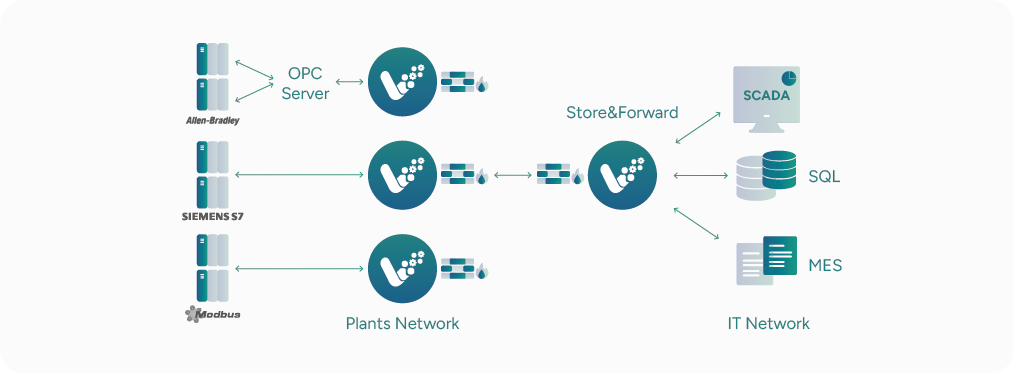
vNode can run at both ends: a gateway at each remote site collects data from the local controllers, and a central vNode concentrates the data from every remote in one place.
Store & Forward, built into the core
The moment a remote gateway loses connection to the central one, vNode starts buffering locally. Buffer size depends on your hardware, not on a license limit.
Sequential resync on reconnect
Once the connection to the central vNode is back, it resends every buffered record one by one, in the exact order it happened, until fully caught up.
Standard TCP/IP transport
Runs over LAN, WAN, VPN, or VLAN: whatever standard your remote-to-central connection uses, Store & Forward works the same way.
USE CASE · INFINITY POWER, SENEGAL
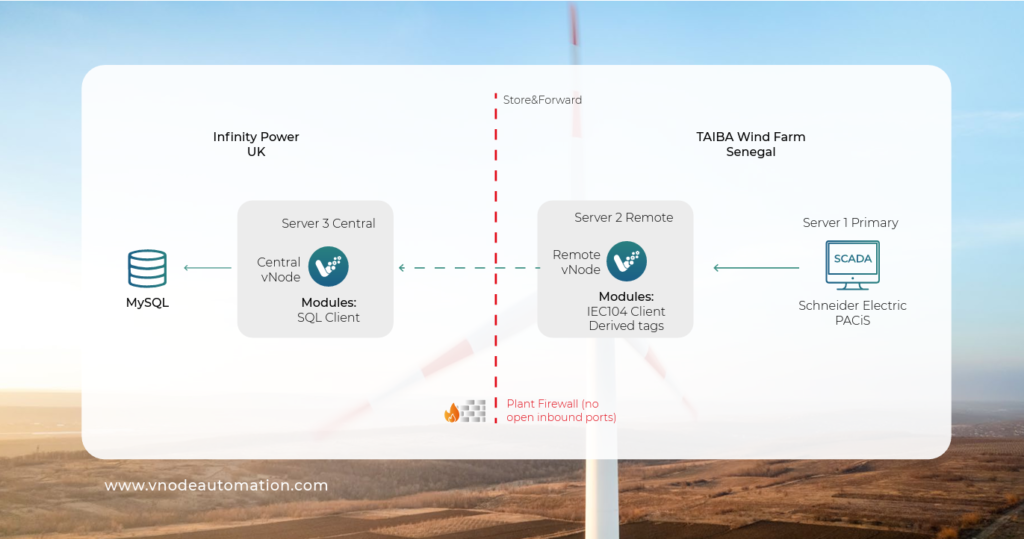
A wind farm in Senegal. A control center in the UK. Zero data lost between them.
A remote vNode collects 1,600 tags, about 185 events per second, from the substation and buffers locally if the connection drops. The central vNode in the UK never sees a gap, even when the site goes offline.
Remote vNode · Senegal
Central vNode · UK
HOW IT WORKS
Store & Forward: what actually happens the moment your connection drops.
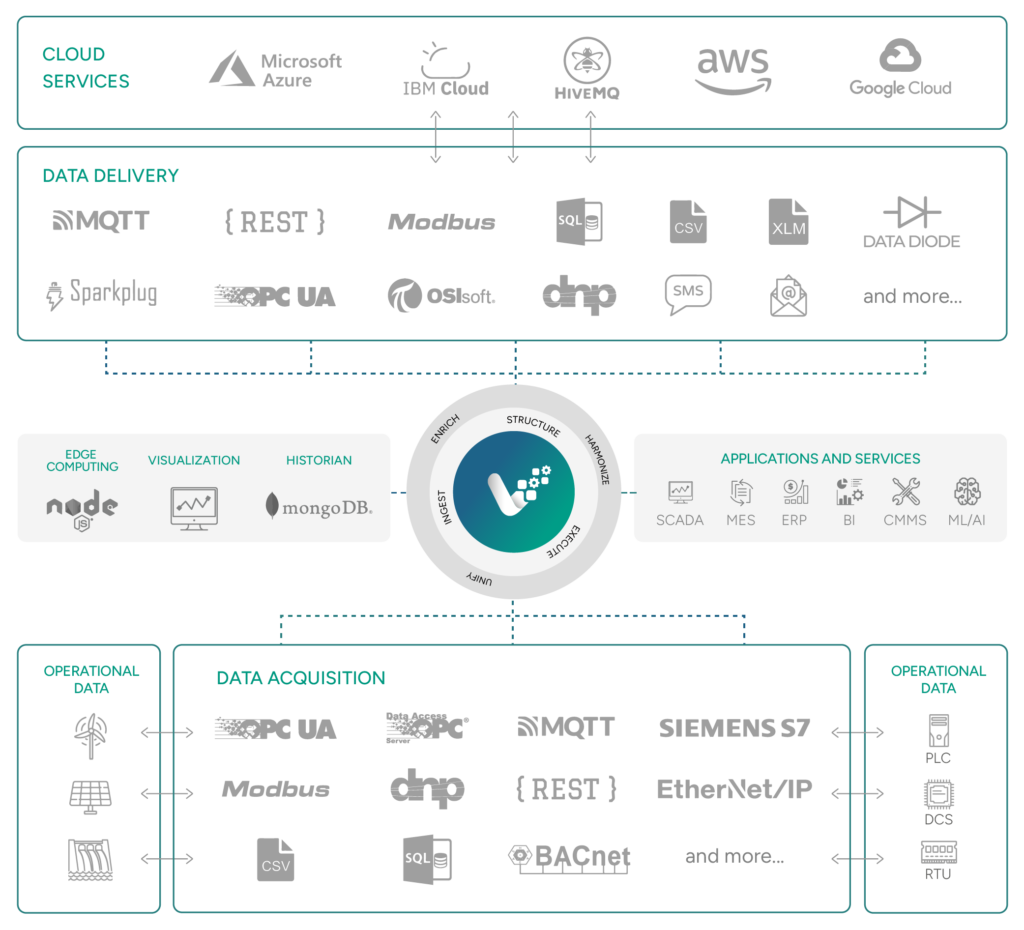
vNode sits closest to your PLCs and controllers, wherever they are. The moment the connection to your platform drops, Store & Forward takes over. It doesn’t stop recording, it just changes where the data waits.
1
Connect
vNode reads your OT systems natively: OPC UA, OPC DA, Modbus TCP/RTU, Siemens S7, DNP3, EtherNet/IP, BACnet, and Sparkplug B. No custom drivers.
2
Store
vNode detects the drop and starts writing every reading to a local buffer. Buffer size depends on your hardware, not on a license limit.
3
Forward
vNode detects the drop and starts writing every reading to a local buffer. Buffer size depends on your hardware, not on a license limit.
CUSTOMER SUCCESS STORY
Source: vNode Success Story — “Successful Implementation of vNode at Taiba N’Diaye Wind Power Station by Infinity Power”
Your data shouldn't depend on your connection. Now it doesn't.
Start your free trial and see what happens to your data the next time the network goes offline.
FAQ
What exactly happens to data when the connection between a remote site and Central drops?
vNode keeps recording locally. In the Remote/Central architecture, each remote vNode buffers every reading in a local store, sized only by the hardware’s own storage capacity, not by any license limit, until the connection to Central is restored.
In what order is buffered data resent once the connection comes back?
Sequentially, one record at a time, in the exact order it was originally captured, until the buffer is fully drained. No manual recovery step is needed.
Is Store & Forward a paid add-on?
No. It’s automatically included as soon as you connect 2 vNodes — no separate license or paid module required.
What kind of network does Store & Forward work over?
Any standard TCP/IP transport: LAN, WAN, VPN or VLAN. It works the same way whether the remote-to-central link is a private line, a VPN over the public internet, or a corporate WAN.
Is this proven at scale in production?
Yes. The solution is already deployed across multiple production projects. One example is Infinity Power’s Taiba N’Diaye wind farm in Senegal, where a remote vNode collects around 1,600 tags—approximately 185 events per second—from the substation via IEC 60870-5-104. It securely transmits the data using TLS 1.3, without opening any inbound ports, to a central vNode at Infinity Power’s UK offices, which feeds a MySQL database and Nispera APM.
Where do I find technical documentation?
You can access the vNode User Manual or download the latest software version here.